Grow your first plant in a few minutes.
PlantGen is a command-line tool, plantc, and the library of species it grows. Each species is a short JSON spec; plantc grows it from seed and turns what grew into images, meshes and packages, on your own machine, with no network and no GPU.
plantc from source. It grows 284 species today, many of them still rough. Commands and formats may change. Tell us what breaks on GitHub Discussions.Build plantc from source
You need git and a Rust toolchain. The easiest way to get Rust is rustup; the repository's rust-toolchain.toml pins the version, and rustup fetches it the first time you build.
$ git clone https://github.com/jferments/plantgen
$ cd plantgen
$ cargo build --release
$ ./target/release/plantc help
The build takes a minute or two. The generator depends only on libm, png, serde, serde_json and sha2, and nothing it runs uses the network, another process or AI. The same species and seed give the same plant, bit for bit, on every machine.
The examples below call it as plantc. Add target/release to your PATH, or type ./target/release/plantc.
List the species, then render one
plantc list prints every species by family, with the plant program that grows it:
Acanthaceae:
  avicennia-germinans          black mangrove (Avicennia germinans), program `broadleaf`
Apiaceae:
  azorella-compacta            llareta (Azorella compacta), program `cushion`
  heracleum-maximum            cow parsnip (Heracleum maximum), program `herb`
…
Render a saguaro at its oldest age, seen from three-quarters, with every flower and fruit drawn as its own mesh:
$ plantc render carnegiea-gigantea --out saguaro.png --view three-quarter --parts on
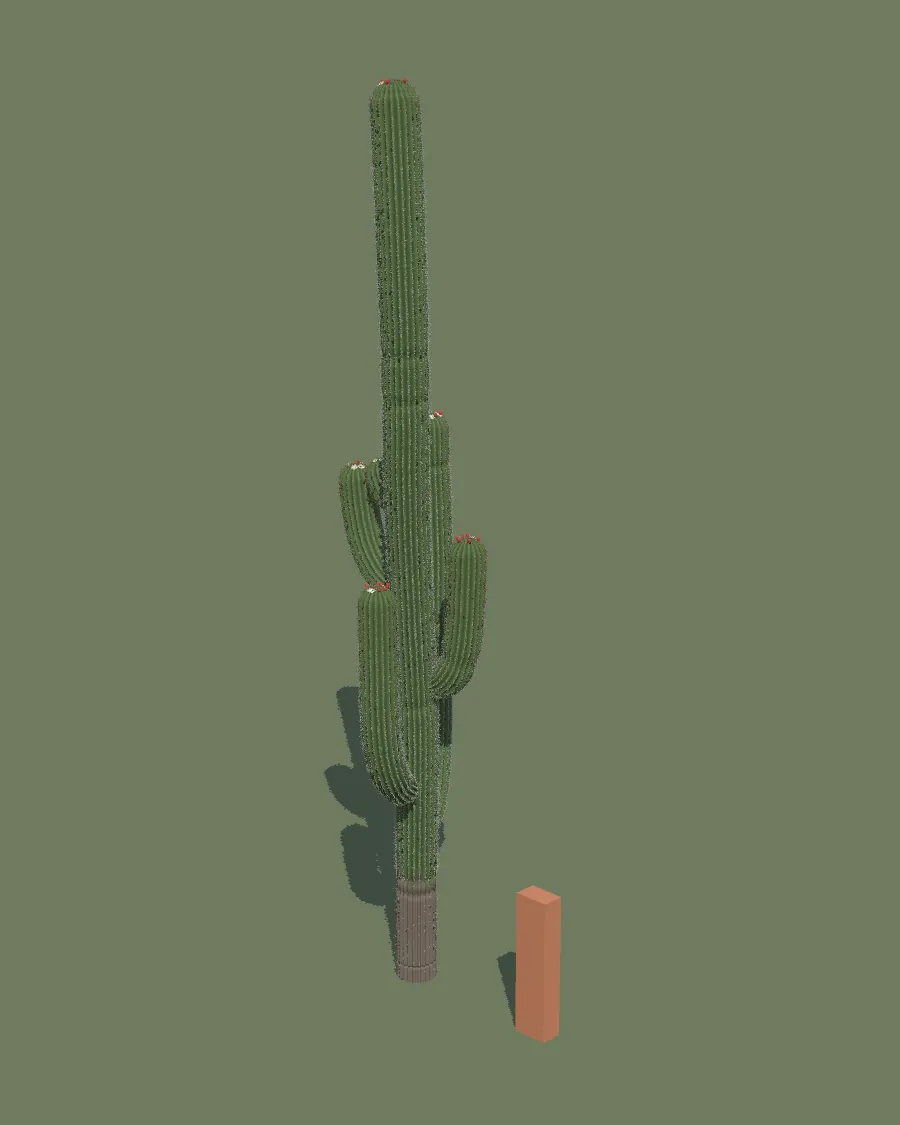
saguaro.png, exactly as plantc writes it. The orange block is a 1.8 m figure for scale; plants under 1.5 m get a rod in 10 cm stripes.It prints what it grew:
age 175.0  height 11.1 m  crown radius 1.19 m
wrote saguaro.png: LOD0, 191468 triangles
  (115584 wood, 75884 cards),
  18971 areoles of solid spines
Every spine is real geometry: almost 19,000 areoles, each with its own solid spines.
Grow it the way you need it
A plant isn't one model. Change its age, where it grows, the day of the year or its seed, and plantc grows a different plant.
| Option | Does |
|---|---|
--age N | Age in years. Default: the species' oldest keyframe. |
--env ENV | Where it grows: open, edge, interior or suppressed. Light and crowding shape the crown. Default: the species' typical site, from its conditions.json. |
--day N | Day of the year, 1 to 365 (default 196): buds, flowers, fruit and leaves follow the seasons. |
--seed N | Another individual of the same species. |
--view | side, three-quarter or top. |
--lod 0-3 | Level of detail, from full geometry (0) to the lightest (3). |
--size PIXELS, --quality | Image size, and draft or standard meshes. |
--focus X,Y,Z --span M | A close-up of SPAN metres around a point of the plant (metres from its foot, +Y up). |
--parts on | Draw every flower, fruit, cone and needle shoot as its own mesh. |
Numbers, not just pictures
plantc grow grows one plant and prints its size at every keyframe:
$ plantc grow pseudotsuga-menziesii --env open
Douglas-fir (pseudotsuga-menziesii), open environment, seed 1: grown in 3.1 s; peak 594818 modules, 45738 segments, 77676 organs
  age   5.0  height  1.44 m  dbh   1.3 cm  crown base  0.00 m  crown radius  0.46 m  leaf area   7.21 m²  organ light 0.16 (lowest tenth 0.01)
  age  15.0  height  7.19 m  dbh  20.7 cm  crown base  0.30 m  crown radius  2.56 m  leaf area  159.4 m²  organ light 0.14 (lowest tenth 0.01)
  age  30.0  height  17.2 m  dbh  39.5 cm  crown base  0.43 m  crown radius  4.99 m  leaf area  567.4 m²  organ light 0.19 (lowest tenth 0.04)
  age  60.0  height  34.5 m  dbh  80.0 cm  crown base  0.43 m  crown radius  8.49 m  leaf area 1339.8 m²  organ light 0.22 (lowest tenth 0.06)
That's a Douglas-fir from 1.4 m at 5 years to 34.5 m at 60, with its trunk diameter at breast height (dbh), crown and leaf area. plantc measure prints the crown's shape, for one species or every species in a library.
Compare individuals and ages
plantc lineup renders a row per species, a few seeds each; plantc sheet renders every keyframe age in every setting the species defines:
$ plantc lineup carnegiea-gigantea stenocereus-thurberi ferocactus-wislizeni opuntia-engelmannii --seeds 3 --size 240 --out cacti.png
$ plantc sheet prosopis-velutina --size 220 --out mesquite-sheet.png
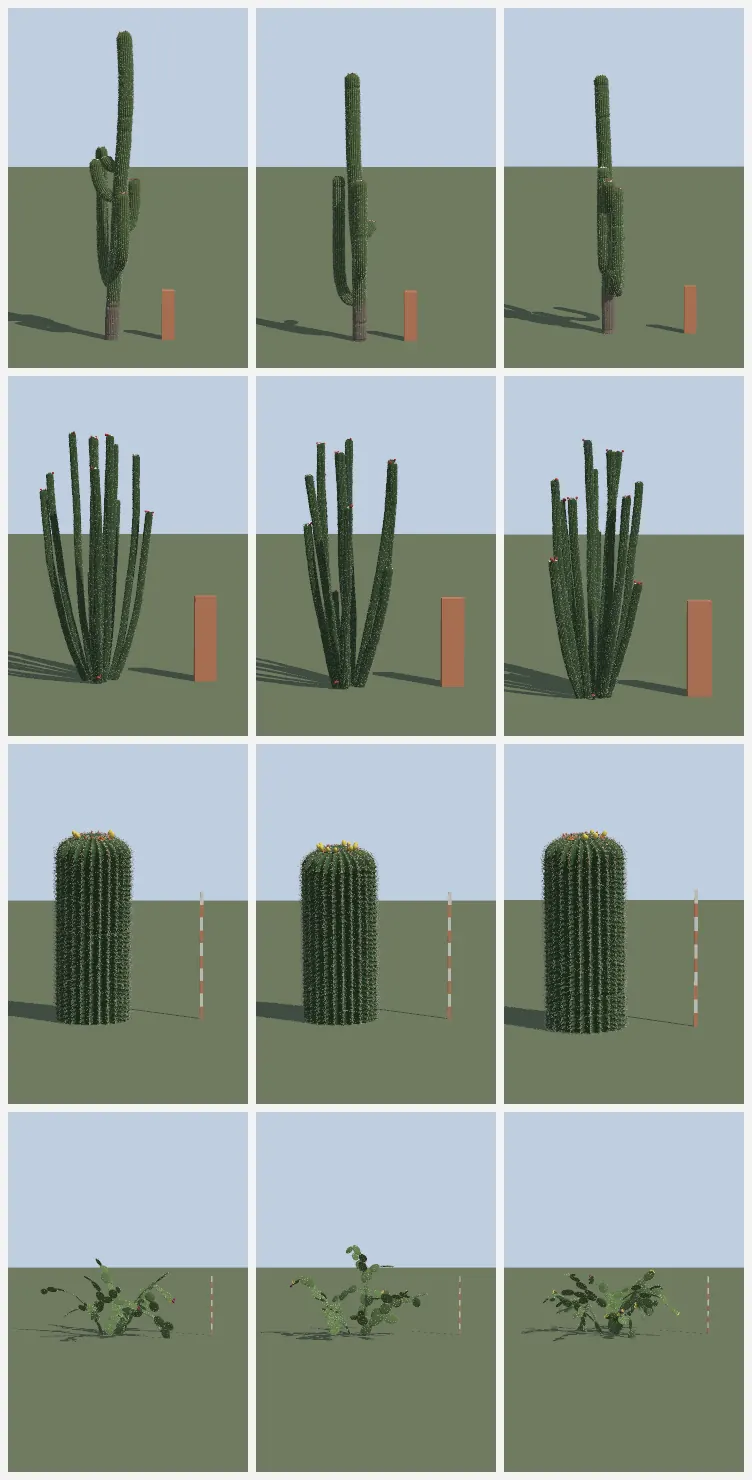
cacti.png: saguaro, organ pipe, fishhook barrel and Engelmann's prickly pear, three seeds each.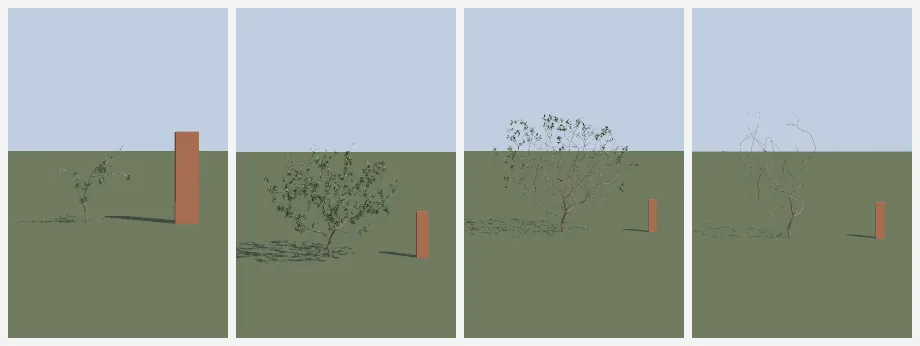
mesquite-sheet.png: a velvet mesquite at 5, 20, 60 and 120 years. It dies at 100 and stands as a snag.plantc year draws each organ through the seasons, plantc parts each organ type alone, and plantc atlas the species' leaf, needle and flower textures.
Build a package
$ plantc build carnegiea-gigantea --out plants
$ plantc inspect plants/carnegiea-gigantea-*
plantc build grows the species' variants and writes one package: meshes at four levels of detail, impostors for the distance, the organ card textures drawn from the species' looks, solid spines, and part meshes for flowers, fruit and cones. It prints the package's key, a hash of the spec, the program and the generator's revision, so a package that's already built isn't built again. plantc inspect checks every object in a package and summarises it, with each variant's size and triangles at every level of detail.
Packages are big at full detail: the saguaro's six variants (every age it defines, in each setting) come to 213 objects and 166 MiB. --quality draft builds lighter meshes.
From Rust, depend on the plantgen crate (crates/plantgen) to grow plants inside your own program.
All the species of a place
In the library, pick the botanical countries your world covers, filter by growth form or native species, and download the set. The zip holds species.csv (every species, ranked by how common it is), the specs it uses, set.json, credits and the licence. Then grow any of them:
$ unzip pacific-northwest.zip && cd pacific-northwest
$ plantc check specs/pseudotsuga-menziesii.json
$ plantc render specs/pseudotsuga-menziesii.json --age 30 --out douglas-fir.png
Most library species don't have a spec of their own yet. Until they do, they grow from their genus's, family's or growth form's spec; species.csv says which.
A species is a folder of JSON
Every species lives in its own folder, filed by family and genus: library/<family>/<genus>/<id>/. Two files are required and two are optional:
spec.json: its form and looks, the parameters of the plant program that grows it, and its reference sizes. The program itself comes from its taxa: here the horsetail family'sequisetaceae.conditions.json: the site it typically grows on.niche.json(optional): where it grows, as climate, moisture and elevation ranges.shed.json(optional): what falls from it.
Here are the giant horsetail's (excerpts):
// library/equisetaceae/equisetum/equisetum-telmateia/spec.json
{
  "id": "equisetum-telmateia",
  "taxon": { "scientific_name": "Equisetum telmateia", "common_name": "giant horsetail" },
  "growth_form": "fern",
  "generator": {
    "params": { "stems": 10, "stem_height": 1.2, "nodes": 18, "leaves_per_node": 16, … }
  },
  …
}

// conditions.json
{ "schema": 1, "preset": "open" }
To make your own, start from a close relative. Copy its folder into a library of your own, give it the new species' id (an id starts with its genus) and change its values:
my-library/
└── library/
    └── equisetaceae/
        └── equisetum/
            └── equisetum-arvense/
                ├── spec.json
                ├── conditions.json
                └── niche.json
Point plantc at it with --library DIR. Your species and programs (programs/<name>.lsys) join the built-in ones, or replace those with the same id:
$ plantc check equisetum-arvense --library my-library
$ plantc render equisetum-arvense --library my-library --out field-horsetail.png
86 plant programs, written in PlantGen's open L-system language, grow every species. A family, order or genus file names the program for its species, and a lineage's program extends the one above it, from shared bases such as herb, conifer and fern down to a family's own; plantc rules lists each program's home. To try a changed program, pass --program FILE.lsys. How plants are made follows four species from their characters to their meshes.
Plants on the GPU
PlantLab, in the repository's lab/ folder, grows plants under the conditions you choose and shows you what they look like: in a window, as thumbnails (one PNG per species with a JSON file describing it), as review sheets, and in batches. --clear draws the plant alone on a transparent background; the pictures in the library and on the home page are made that way.
$ cd lab
$ cargo run --release -p plantlab -- thumbs carnegiea-gigantea polystichum-munitum --out thumbs
$ cargo run --release -p plantlab -- thumbs all --out thumbs --quality draft
It needs a GPU with Vulkan, Metal or DirectX 12, or Mesa's software renderer (lavapipe) without one. Its first build takes about ten minutes.
All commands
| Command | What it does |
|---|---|
list | The species and plant programs, by family. |
check | Check a spec or a program and report the first problem, with its line. |
grow | Grow one plant and print its size at every keyframe. |
render | Render one plant at one age. |
sheet | Render every keyframe age in every setting. |
lineup | A row per species, a few seeds each. |
year | Each organ through the seasons, a column per day. |
parts | Each organ type alone, as a solid and as a card. |
measure | The crown's shape and leaf size, for one species or a whole library. |
atlas | The species' leaf, needle and flower textures. |
ground | The ground looks plants make: needles, leaves, thatch, moss, litter. |
build | Build a package of meshes, levels of detail and impostors. |
inspect | Check and summarise a package. |
plantc help prints every option. Every command takes --library DIR.
Questions and feedback
PlantGen is developed by its owner and doesn't take issues or pull requests; everything goes through Discussions. The code is yours to fork under the MIT licence.